 |
Searching
for routes gives you the following great options
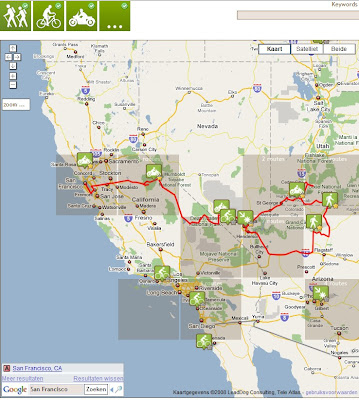
- Pan or zoom the map to see the routes in the area you
like to see
- If there are a few routes in an area, they are
clustered in a clusterbox (grey).
- One of the many routes in the clusterbox is
displayed with an icon
- You can click on the grey clusterbox to zoom in
till you see all the individual routes
- Click on the route type at the top (walk, bicycle,
motor, other,...) to select the types you want to see on the map
- The list on the right shows the displayed routes on
the map (not all the routes in that area!)
- When you move the mouse over the route icon on the
map or in the list, you can see the track of the route displayed on the
map
- You want to see the route in the RouteViewer? Just
click on the icon.
- Looking for something specific? Enter a keyword in
the searchfield. Don't even bather to press enter. The search engine
start looking in the area of your map right away when you stop typing.
- You want to go to a specific area, but you don't know
where that is? Type in the address in the field at the bottom
left.
Very soon, you get an advanced search too!
|